

Security advice is easy to give and hard to act on. So instead of another list of best practices, here is a story. The names are changed, but the situation will feel familiar to anyone running a fast-moving software team. It shows how a mid-sized SaaS company stopped treating security as a separate chore and built it into the way they already work, with help from topscan along the way.
The Company and the Problem
Picture a SaaS business with about forty engineers. They released updates several times a week and were proud of how quickly they moved. Speed was their edge. But security lagged behind. Their routine looked like this:
- A scan was run by hand, about once a month.
- The results landed in a long report that one overworked person reviewed.
- Flaws appeared weeks after the code that introduced them had gone live.
It is easy to spot the issue here. New code went live every few days, but security checks happened every few weeks. This mismatch meant flaws could sit in production for a long time before anyone noticed.
The Turning Point
The wake-up call was not a breach, which was lucky. It was a customer security questionnaire. A large prospect asked how often the company tested its code for weaknesses. Admitting they scanned only about once a month, and by hand, nearly cost them the deal.
The lead engineer made a decision. Security testing had to happen at the same pace as their releases. If code went out several times a week, scanning had to keep up. The plan was to move testing into their CI pipeline.
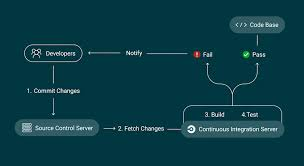
For anyone unfamiliar, CI stands for continuous integration. It is the automated process that builds and checks new code every time an engineer submits a change. Adding a security scan to this flow meant every change would be tested as a matter of course.
What The Team Changed
The team used both GitLab and GitHub across different projects, so the fix had to work with both. Here is the path they followed.
- They added a scan step to the build. Each time new code was submitted, the pipeline triggered a scan automatically. No one had to remember to start it.
- They used webhooks to connect the tools. A webhook is a simple way for one system to tell another that something happened. When a build finished, it signaled the scanner to begin.
- They routed alerts to Slack. Instead of a buried email report, findings appeared in the channel that the team had already watched all day. A serious issue was noticed in minutes.
- They set sensible rules. Critical findings could pause a release until fixed. Minor ones were logged for later, so the team was not blocked by noise.
TopScan fits in here naturally. It connects directly to GitLab and GitHub, starts scans through webhook triggers, and sends results to Slack. The team did not have to build any of that plumbing themselves. They pointed the platform at their projects, set their rules, and the scanning ran on its own from then on.
The Results
The improvement showed within weeks, and it was felt in day-to-day work.
- The time between a flaw being introduced and being caught dropped from weeks to hours.
- The overworked reviewer stopped drowning in monthly reports and handled small, steady streams instead.
- The next security questionnaire was easy to answer, and the deal went through.
- Engineers started fixing issues themselves because findings showed up right next to their normal work.